TAG | apps

Jan 20, 2012

Site Lets Lawyers Build Their Own Mobile Apps

I happened across a website called MyPocketAttorney that says it will let lawyers build their own smartphone apps using templates designed for law offices and legal professionals. As of this morning, a notice on the site says, “Site Under Construction! Launch Date 1-20-2012.” Today being Jan. 20, we’ll see if it launches. The site describes [...]

Bookmark and Share

Jan 19, 2012

Read the Congressional Record on Your iPad

The Library of Congress unveiled a new app yesterday designed to let you read the Congressional Record on an iPad. Called simply The Congressional Record, the purpose of the new app, as In Custodia Legis reports, “is straightforward — easily read the daily edition of the Congressional Record on your iPad (and maybe save a few trees in the process).”

According to the description, the app lets you:

  • Browse editions of the Congressional Record by date, from Jan. 4, 1995, to the present.
  • Perform keyword searches within individual documents or sections within documents.
  • Share documents via email.
  • Save documents to your preferred iPad PDF reader.
  • Identify the latest bills and resolutions considered daily on the floor of the U.S. House.
  • Identify the latest bills, resolutions, treaties and nominations considered daily on the floor of the U.S. Senate.

Read more about the app here.

Bookmark and Share

Jan 18, 2012

App Will Let Lawyers Pick Pro Bono Cases

The Legal Services Corporation’s Technology Initiative Grants program held its annual conference last week in Albuquerque. I wasn’t there, but I wish I had been. The conference focused on exploring innovative ways of using technology to promote full access and high-quality legal representation for low-income people. Read the program book to get a taste of what was covered.

One clever idea introduced there was iProBono, an iPhone app that allows attorneys to review and sign-up for pro bono cases. The app is being developed for the Arkansas Legal Services Partnership. The developers’ site indicates they would develop the app for other states.

The app will let Arkansas lawyers view a list of current pro bono cases, and search and filter the cases by topic, location and other parameters. Lawyers will be able to accept cases directly through the app, after which the app will show a list of their active and completed cases.

It appears the app has not yet been released, since I can’t find it in the iTunes store. The Arkansas Legal Services Partnership site describes it as “soon to be available.”

Will a pro bono app cause more lawyers to take these cases? Probably not. But it will make it easier for those who are willing. In any event, it’s a good example of how even small-scale technology innovations can help make legal services more broadly available.

Bookmark and Share

Jan 16, 2012

Legal Ethics to Go, Thanks to New Bar App

A new mobile app introduced this week by the New York State Bar Association lets lawyers search and access ethics opinions from their mobile phones. The NYSBA Mobile Ethics App includes the state bar’s catalog of more than 900 legal ethics opinions, dating back to 1964.

The app allows users to search for an opinion by keyword, retrieve it by opinion number, or browse a list of categories such as “attorney advertising,” “concurrent representation” and “non-refundable retainer.” Results show both a digest of the opinion and its full text. It can notify you when new opinions are added.

The free app is available for iPhones, iPads, Android phones and BlackBerrys.

Bookmark and Share

Jan 9, 2012

And Now for a Few of My Favorite Smartphone Apps

Just last week, someone asked me for a list of my favorite iPhone apps. I get this question a lot, so I thought I’d talk about about a few of my favorite apps.

No Angry Birds here. I will restrict myself to apps that have some application in the practice of law. That does not mean they are all apps specifically targeted to lawyers. But I hope that they are all apps you will find useful. In fact, you may already have many of them yourself.

I use all of these apps on an iPhone, but most are also available for Android and BlackBerry. I’ve designated that using “A” for Android and “BB” for BlackBerry.

Evernote. This app promises to turn your phone into an extension of your brain. That is not entirely an exaggeration. The wonder of Evernote is its ability to synchronize everything from everywhere. Add text, audio or photos on your smartphone. Save PDF documents or clip Web pages on your computer. Whatever you add to Evernote, it is automatically synchronized among all your devices and is also available via the cloud. All this is free, or you can buy the premium version that provides greater storage capacity and enhanced features. (A, BB)

Dropbox. In much the same way that Evernote is a wonder, so is Dropbox. Drag anything into the Dropbox folder on your computer and it is almost immediately available on your mobile device or via any Web browser. Revise a document or edit a photo on your desktop Dropbox folder, and the changes appear anywhere you access Dropbox. With Dropbox, you’ll never be without an important document or file. Plus you can use it to share with others. (A, BB)

Dragon Dictation. Many lawyers are familiar with the desktop version of this popular voice-recognition application. With this app, you can use your smart phone to quickly create email and text messages, send yourself notes and reminders, and update your status on Twitter or Facebook – all virtually hands-free. (A, BB)

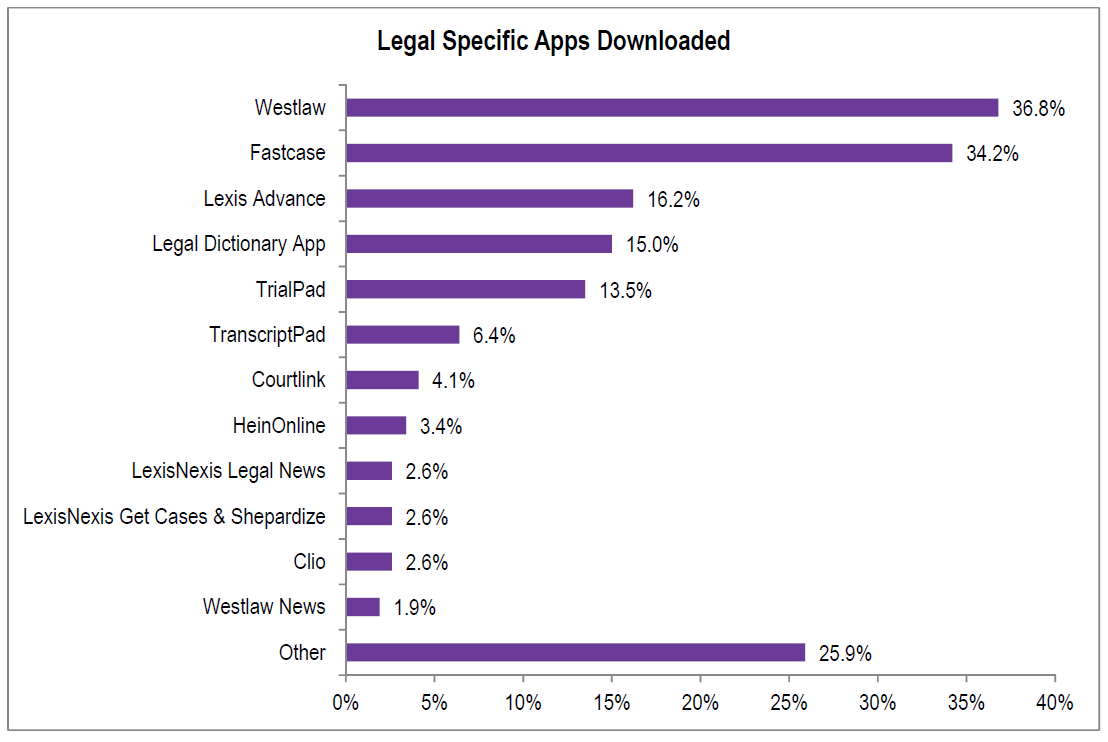
Fastcase. I continue to marvel at this app, which lets you research cases and statutes on your iPhone, entirely for free. Search a full library of federal and state cases and statutes. Use natural language or Boolean queries. Search across jurisdictions and dates or narrow your search. Select how many results to show and how to display the results – by relevance, date or name. This could be a case-saver in the courtroom.

Google Search. You use Google non-stop on your computer. Why not make it easy to use on your iPhone? This is the app that does that for you, even allowing you to simply speak your search query into your phone and to search based on images from your phone’s camera. The app also allows quick access to other Google applications, such as Reader, Translate, Docs, Photos and more. (A, BB)

Adobe Reader. As you might expect, this is the best app for viewing PDF documents on your smartphone. (A, BB)

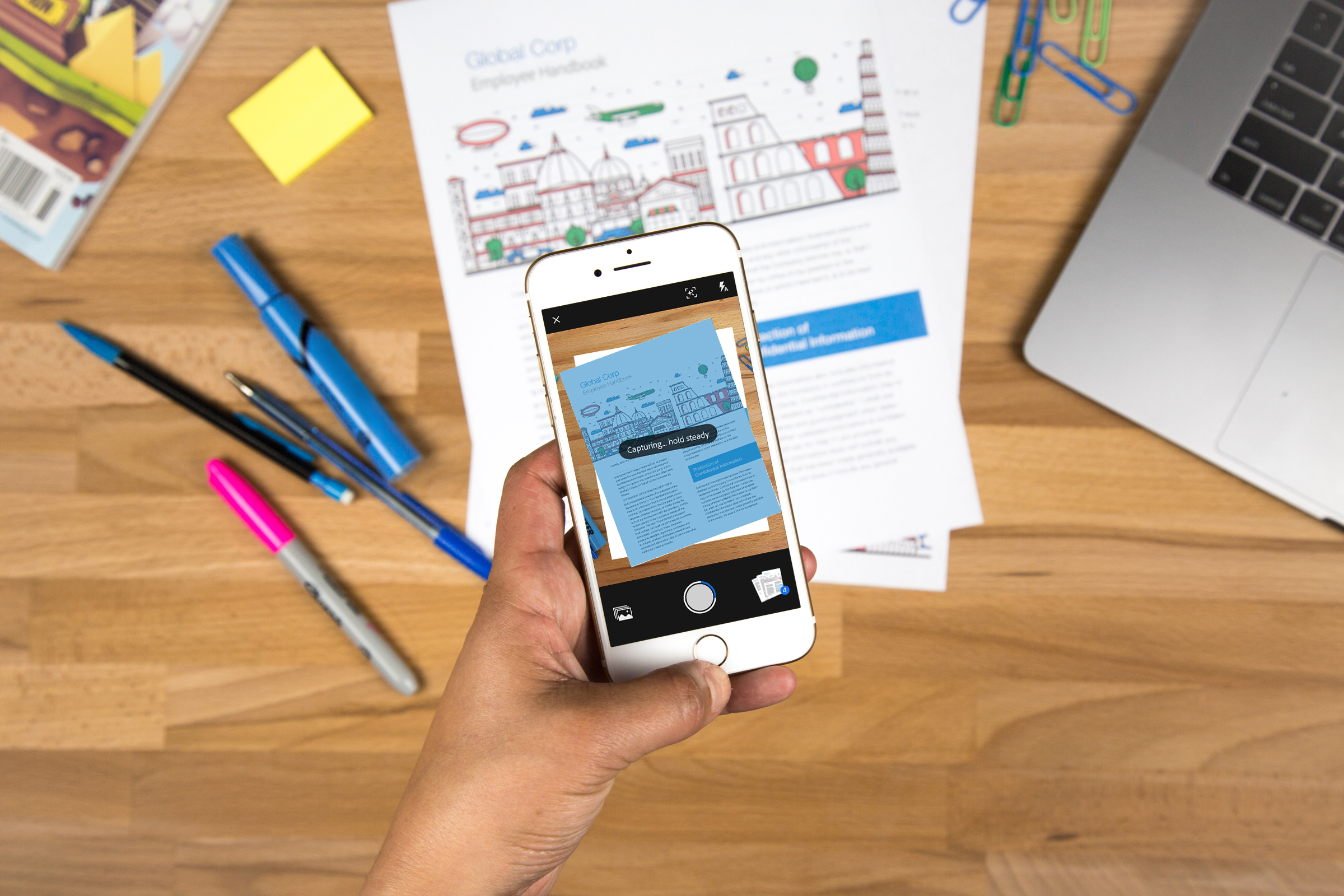
Genius Scan. This free app lets you use your phone as a pocket scanner. Open the app, point your camera at the document, take the picture, and the app optimizes the image and saves it as a JPG or PDF file. From there, you can save it to your phone, share it with your computer over WiFi, email it, or tweet it. With the paid version ($2.99), you can easily export your scans to Dropbox, Evernote and Google Docs. Perfect for receipts.

Skype. Make free voice and video calls with this app on your phone. It works just as well as Skype on the computer. Call other Skype users for free and call landlines at low rates. If you travel outside the U.S., this is a must-have that lets you avoid the high cost of international cell phone rates. Wherever you have Wi-Fi access, you have Skype access. (A)

Adobe Photoshop Express. Adobe Photoshop is the top-of-the-line software for editing digital images. This slimmed-down version lets you easily make quick edits to photographs you take with your mobile phone. Crop pictures; adjust exposure, contrast and color; apply filters; add special effects; and create borders. (A)

WordPress. With this app on your phone, you can manage any WordPress blog or even multiple WordPress blogs. Use it to create or edit posts and pages, add images and video, and moderate comments. (A, BB)

CamCard. Here is the solution for handling all those business cards you pick up. Take a picture of the card and CamCard recognizes the contact information and saves it to your address book. It will also read QR code business cards. Once you’ve saved the information, you can search for the contact on LinkedIn or export the information to Excel. (A, BB)

Tweetdeck. Keep plugged in to your social networks with this app. Monitor and post to all your Twitter and Facebook accounts. This companion to the Tweetdeck desktop application was recently completely rebuilt to make it faster and more versatile. As with the desktop version, you can add and configure columns for different accounts and different searches. (A)

Wikipedia Mobile. Need a quick answer to a question? This app provides an easy interface to the Wikipedia Web encyclopedia. If you can’t find an answer here, the question probably wasn’t important to begin with. (BB)

Priceline Negotiator. Using Priceline’s “name your own price” feature for hotel rooms and car rentals, I’ve snagged some great deals, even on four-star hotels in major cities. With this app, you can find a great deal wherever you are. Besides letting you search for rates or name your own price, it offers “tonight-only deals” you can grab on short notice. (A)

RedLaser. This turns your phone into a bar-code and QR-code reader and then helps you find the best price. Say you’re in the office-supply store for a toner cartridge. Scan the bar code and RedLaser will show you the prices of the same item at other nearby stores and also at online retailers. For books, the app will even show local libraries that have it. (A)

NPR News. If you’re an NPR junkie like I am, get this app. Listen to NPR programs live from any NPR station anywhere in the country, download NPR podcasts, get hourly newscasts, and read headline news. (A)

LinkedIn. Keep connected to the leading professional networking site even when you’re away from your office. Use it to keep up with your connections and groups, provide updates on your status, and follow industry news. (A, BB)

Facebook. If you plan to access Facebook from your iPhone, get this app. It makes Facebook much easier to use than it would be using the phone’s mobile browser. Besides allowing you to keep in touch with your friends wherever you are (and to find ones who are nearby), the app makes it easy to upload photos and video. (A, BB)

Opera Mini Browser. The Safari browser that comes loaded on the iPhone can be slow and can fail to properly display many web pages. Like its desktop counterpart, the Opera Mini Browser is blazingly fast. It can accurately display pages that Safari cannot handle and is far more configurable than Safari. (A)

Kindle. Even if you do not own a Kindle e-reader, you can read any Kindle book on your iPhone using this app. If you do have a Kindle, or if you have the Kindle reader on your computer, this app keeps both synchronized, so you can pick up reading on one device where you left off on another. (Another e-reader app I recommend is Stanza.) (A)

Pandora. Even lawyers need a little music in their lives. Pandora describes itself as “radio that only plays music you’ll love.” With this app, you can have all the music you love even when you are on the road. (A, BB)

I could go on for pages about other apps I use. Unfortunately, I have work to do. Thus, begrudgingly, I will have to stop here.

Bookmark and Share

Dec 28, 2011

Wolfram|Alpha Releases App to Assist Lawyers

iPhone version.

Wolfram|Alpha, the “computational knowledge engine,” has released an iPhone and iPad app designed specifically for legal professionals. The Wolfram Lawyer’s Professional Assistant provides basic reference information — such as a dictionary of legal terms and the statutes of limitations for every U.S. state — as well as a variety of computational tools.

For anyone unfamiliar with the Wolfram website, it is a search engine of a sort, except that it does not search the web. Rather, it answers your queries by doing dynamic calculations based on its own broad collection of data. Ask it, “How many lawyers in the U.S.?” and it returns a page saying that there are 556,790 employed U.S. lawyers and that they earn a median annual wage of $110,590.

The app lets you perform various calculations on your iOS device. It lets you:

  • Perform calendar computations to determine the end date of a specific term.
  • Perform financial computations, such as fee calculations, settlement calculations, current interest rates, historical value of money, and federal tax rates.
  • Ascertain crime rates and histories for specific crimes, as well as state and national average comparisons.
  • Obtain demographics of population and economy for specific cities and international information about currency, country economies, and languages spoken, as well as time zone conversions.
  • Get investigative information, including weather, company information and IP lookup.
  • Calculate blood alcohol.
  • Perform damages and estate-planning computations for occupational salaries, costs of living, life expectancy, and present or future values.
  • Calculate numbers for real estate transactions, including mortgage calculations, closing cost estimation, information on square footage, home sales price, and utility prices.
The cost of the app is $4.99.

iPad version.

Bookmark and Share

Oct 19, 2011

The Lawyer’s Deskbook Goes Mobile

A company run by a Texas criminal lawyer has introduced a mobile app designed to enable attorneys to quickly access statutes and case law from the courtroom, the boardroom or wherever they may be. The app, PUSH Legal, enables lawyers to load up their mobile devices with a library of annotated deskbooks covering a range of legal topics.  The app is available for iPhone, iPad, BlackBerry and Android devices.

The idea is good but the price tag might be hard to swallow for many lawyers. The app itself is free and comes preloaded with the Federal Rules of Evidence. For roughly the next two months, you’ll be able to download a 45-day trial version of any of the other volumes for 99 cents. Thereafter, each book will be sold as an annual subscription at a minimum cost of $29.99, with some costing as much as $149.

What you get for that are books containing statutes or rules along with brief annotations of leading cases. The app also links directly to Google Scholar, using preconfigured search queries to find additional cases and articles there.

For example, if I open the Federal Rules of Civil Procedure volume, I find an outline of the rules. If I navigate to a specific rule, I come to a page that contains the text of the rule. From that page, I can click a tab, “Leading Cases,” to display a brief list of what are supposed to be the leading cases interpreting the rule. The list has a one-paragraph summary of the case and a link to the full text in Google Scholar. Also from within that window, I can click a link, “Click here for more annotations,” to open a page in Google Scholar that displays the results of the preconfigured search query related to the rule.

You may have noticed above that I said it displays a brief list of “what are supposed to be the leading cases.” I was surprised to open the Federal Rules of Evidence volume and click on Rule 702, governing testimony by experts, and find only one case, the 8th Circuit opinion in Fox v. Dannenberg, but no reference to the seminal case, Daubert v. Merrell Dow Pharmaceuticals. That said, if you click on the “more annotations” link, the first case shown in Google Scholar is Daubert.

In a phone call with PUSH Legal’s founder, lawyer Jonathan Paull, he acknowledged that the app still has some bugs that need to be worked out. But he expects to have any such issues taken care of before the launch of the full-priced deskbooks later this year.

So far, the majority of the deskbooks are devoted to federal and Texas practice. They include volumes covering Title 18 of the U.S. Code, the federal sentencing guidelines, the federal search and seizure manual, various Texas codes and rules, and various federal court rules. The criminal laws of California, Florida and New York each have a volume, as does the Delaware corporation law.

The company is working to add more volumes from these states and to add other states.

The FAQ on the app’s website says, “Other legal apps contain statutes, but PUSH Legal is the only legal app that contains case law to boot.” As stated, this is not accurate. For one, the Fastcase app provides direct access to full-text cases. Of course, the difference with PUSH Legal is that it ties key cases to the rules and statutes they interpret.

[Update: After I posted this, PUSH Legal revised the FAQ to say it is "the only legal app that ties key cases to the rules and statutes they interpret."]

As I noted, you can install this app for free and try out its pre-loaded FRE volume. For the price of a song, you can also try out any of its other volumes.

By Jan. 1 at the latest, the company will begin charging full freight for these volumes. At that point, users will have to confront the question of whether it’s worth $29.99 per volume per year to have these on their mobile devices. To my mind, the answer to that question will depend entirely on how well annotated they are.

Bookmark and Share

Jul 26, 2011

Even a Solo Can Have a Clever Mobile App

A growing number of larger law firms are releasing their own mobile apps. But what about solo and smaller firm lawyers? Last week, Aaron Kelly, a solo who practices Internet law in Scottsdale, Ariz., released an app for Apple and Android devices. It incorporates a couple clever ideas that could provide inspiration for other small-firm lawyers thinking of developing apps of their own.

The app is designed to give Kelly’s clients access to information about their cases. To this end, the app features integration with both file-sharing site Dropbox and project-management site Basecamp. With the integration of those tools, the app lets clients review their documents and check the status of their matters. The app also integrates PayPal, so that clients can use it to pay their invoices.

The app also includes features you might expect. It allows users to follow the firm’s news and blog posts and to follow its Facebook, Twitter and LinkedIn feeds. The app can be used to launch a live chat with someone at the firm. It can also be used by a non-client to submit a case for evaluation.

What I like about this app is that it answers the question many lawyers have about creating one in the first place, which is, “Why?” Here, the answer is to give clients easy mobile access to key case information. Yes, even solos can have clever mobile apps.

Here are the links to the app’s Android version and Apple version.

Bookmark and Share

Jul 21, 2011

Fastcase Unveils One-Click Printing of any Case from any Source

Legal research company Fastcase will announce a new utility tomorrow that enables one-click printing of any case from any source on the Web or in any Microsoft Word document. Called Fastcase Cloud Printing, the utility lets you print or save a nicely formatted, two-column version of any case. The utility works with Google Scholar, Westlaw, LexisNexis or anywhere there is a case online.

You can also use it to create and print a list of cases. Say you are reading a case or a brief that contains many citations. With a single click, Fastcase Cloud Printing will generate a list of all the cited cases within the document and let you select the ones you want to print.

The printing utility is installed as an add-on to Internet Explorer or Word. Versions for Google Chrome and Firefox will be released later. For now, the utility works with Web pages and Word documents. Later versions will also allow one-click printing from Outlook and PDF documents.

The utility works by recognizing citations within documents and then using that information to pull the matching case or cases from Fastcase. For example, if you use it to print a case you are reading in Google Scholar, it does not somehow pull the case from Scholar and reformat it. Instead, it finds the corresponding case in Fastcase and presents it for you to print.

One obvious benefit of such an app is simply to be able to print cleaner, better-formatted versions of Web cases. Another is to be able easily to bulk print a set of cited cases.

A less-obvious benefit of this app is that it may save a firm money. In concept, the app is similar to Westlaw Find & Print. But users of Find & Print pay for it by the transaction. Law Firm Bottom Line recently estimated that the cost of Find & Print has increased 144% over five years. The Fastcase utility can eliminate the need to use Find & Print — even from within Westlaw.

Initially, Fastcase will offer the application only to enterprise subscribers, who will receive it as part of their existing subscriptions at no extra charge. Later, the app will be offered to lawyers who have access to Fastcase through their state bar associations, although they may have to pay an added fee for it.

For screencaps of Fastcase Cloud Printing, see below.

The toolbar lets you select to print the case you are viewing, the cases cited within the case, or a citation you enter. It then takes a few seconds for Findcase to retrieve the cases.

When you choose to print all cited cases, the app lists the cases and lets you select the ones to print.


The formatted case can be printed or saved to your computer.

Bookmark and Share

Jun 14, 2011

Invasion of the Android Attorneys

No, the legal profession is not about to be taken over by automatons carrying briefcases. But an increasing number of lawyers are forsaking their BlackBerrys and iPhones and moving to mobile devices using Google’s Android operating system. And now there’s a blog to help them along the way.

The Droid Lawyer is a blog written by Jeffrey Taylor, an attorney in Oklahoma City, OK. Through the blog, he provides tips and techniques for using an Android-powered device in a law practice.

In recent posts, he has reviewed DroidLaw, an app that runs legal-reference materials; shown how to create PDFs on an Android device; and explained how to take screenshots on an Android tablet to use in a deposition.

[Hat tip to Jim Calloway.]

Bookmark and Share